Mailchimp Review (2026): Is It Still Worth It for Small Business?

Mailchimp is the email platform almost everyone has heard of. For years it was the default choice for small businesses, mostly thanks to its free plan and friendly design. In 2026, that reputation is worth a fresh look.
Mailchimp is still easy to use and well built. The problem is value. Repeated price rises and a shrinking free plan mean it is no longer the obvious pick it once was.
Still polished, but no longer the easy default
Mailchimp is friendly, beginner-friendly, and full of good-looking templates. The catch is cost. The free plan keeps shrinking, automation now needs a paid tier, and the price climbs quickly as your list grows.
Free plan available. Paid plans start at $13/month.
What is Mailchimp?
Mailchimp is an email marketing platform built for small businesses and beginners. It lets you design emails, manage contacts, run campaigns, and build a simple landing page or website. It has been owned by Intuit since 2021.
Its biggest strength has always been how approachable it is. The interface is friendly, the templates look professional, and you can send your first campaign quickly. That ease of use is still its main selling point today.
Mailchimp pricing in 2026
Mailchimp has four plans: Free, Essentials, Standard, and Premium. Pricing is based on your contact count, and each plan has a monthly send limit. The starting prices below were current in 2026, so always confirm on mailchimp.com before you buy.
| Plan | Starting price | Best for |
|---|---|---|
| Free | $0 (250 contacts) | Testing the waters with a very small list |
| Essentials | $13 / month | Basic email, but no multi-step automation |
| Standard | $20 / month | Automation and personalisation (Mailchimp’s recommended plan) |
| Premium | $350 / month | Large teams needing advanced tools and support |
Watch the hidden costs
The starting price is rarely the full story. A few things push the real cost higher.
- Inactive contacts count too. Mailchimp can count unsubscribed and non-subscribed people toward your limit. You end up paying for contacts who will never open an email.
- Automation needs Standard. Multi-step automation was removed from the cheaper tiers. Even a simple welcome sequence now requires the Standard plan.
- Add-ons cost extra. SMS and transactional email are billed separately. Extra users also cost more on top of your plan.
My take: The real bill often runs 20 to 40% above the headline price. If you want any automation, you are really looking at Standard from day one, not Essentials.
Key features (and how they hold up)
Email design and templates
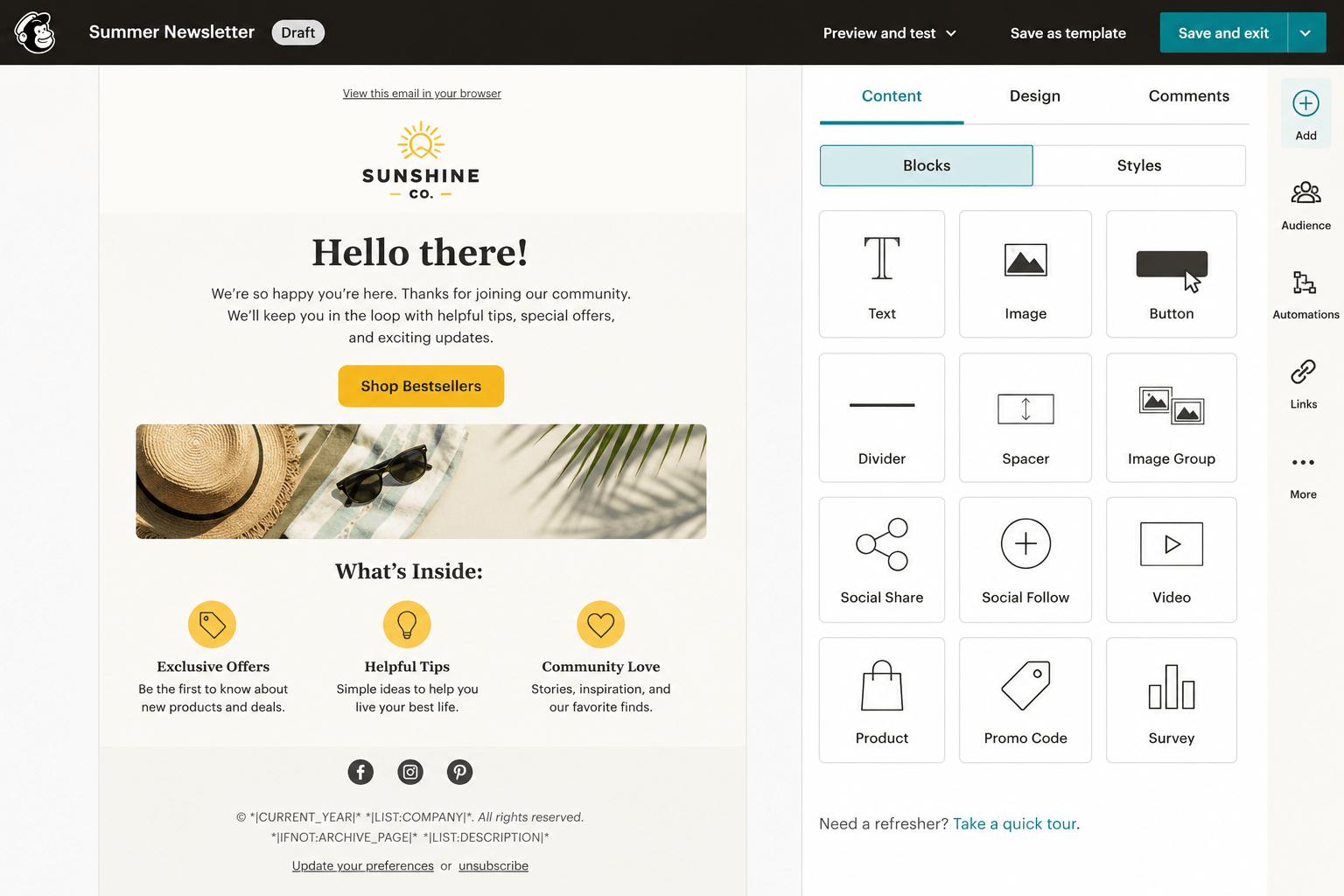
This is where Mailchimp shines. The drag-and-drop editor is easy, and the template library is large and professional. A beginner can build a good-looking email in minutes.
I used Mailchimp’s drag-and-drop editor to build a welcome newsletter for new subscribers. The overall experience was surprisingly beginner-friendly. Most of the blocks snapped into place easily.
Customising spacing and mobile formatting took more trial and error than I expected. My first campaign took about 45 minutes to finish. Once I understood the layout system, creating future emails became much faster.
Automation
Automation used to be one of Mailchimp’s selling points. In 2026 it sits behind the Standard plan, as the cheaper tiers no longer include multi-step journeys. The builder itself is capable, but it is no longer the bargain it once was.
Audience and segmentation
Mailchimp lets you group and tag contacts and send to specific segments. The basics are easy and work well for most small lists. Advanced behavioural segmentation, though, is reserved for the higher tiers.
Reporting
Reports are clear and beginner-friendly. You get opens, clicks, and basic campaign stats without digging through menus. It is enough for most small businesses, even if power users will want more depth.
Mailchimp pros and cons
What I liked
- Genuinely easy to use, great for beginners
- Large library of polished templates
- Familiar tool that integrates with almost everything
- All-in-one, with landing pages and a basic website
- A free plan to test the basics
What frustrated me
- Free plan cut to just 250 contacts
- Automation removed from the cheaper tiers
- Counts inactive contacts toward your limit
- Price climbs steeply as your list grows
- SMS and transactional email cost extra
Who should use Mailchimp?
Mailchimp is a great fit if you:
- Are a beginner who wants the easiest possible start
- Value polished templates and clean design
- Have a small list and send only now and then
- Want a familiar tool with lots of integrations
Look elsewhere if you:
- Need affordable automation
- Have a growing list and watch your costs
- Want a generous free plan
- Plan to make email a main marketing channel
Mailchimp vs the alternatives
Mailchimp’s price rises have made its rivals more appealing. Here is how it compares to two of the most popular alternatives.
| Mailchimp | MailerLite | Kit (ConvertKit) | |
|---|---|---|---|
| Best for | Beginners, templates | Value, simplicity | Creators |
| Free plan | Yes (250 contacts) | Yes (1,000 contacts) | Yes |
| Automation | Standard plan and up | Included | Good |
| Ease of use | Easy | Very easy | Easy |
| Starting paid price | $13 / month | Low, list-based | List-based |
If Mailchimp’s shrinking free plan or rising costs are a problem, you have good options. MailerLite is the easiest affordable switch, and Kit (ConvertKit) is built for creators. For a more automation-heavy choice, read my ActiveCampaign review.
You can also see all three email tools side by side in my Mailchimp vs ConvertKit vs ActiveCampaign comparison.
Frequently asked questions
Is Mailchimp still free?
Yes, but the free plan is now very limited. As of 2026 it covers just 250 contacts and 500 sends per month. For most growing lists, you will outgrow it quickly.
How much does Mailchimp cost?
Essentials starts at $13/month and Standard at $20/month, both for 500 contacts. Premium starts at $350/month. Prices rise as your contact count grows, so check mailchimp.com for your list size.
Does the free plan include automation?
No. Multi-step automation was removed from the free and Essentials tiers. You now need the Standard plan to build automated email journeys.
Is Mailchimp good for beginners?
Yes. It is one of the easiest email tools to start with, thanks to its simple editor and templates. That said, cheaper and more generous alternatives now exist.
What is the best Mailchimp alternative?
It depends on your needs. MailerLite is great for value and simplicity, Kit (ConvertKit) is built for creators, and ActiveCampaign is the pick for serious automation.
The bottom line
Mailchimp is still a capable, polished email platform, and one of the easiest places to start. The catch is value. Repeated price rises, a shrinking free plan, and automation locked behind paid tiers mean it is no longer the automatic choice.
If you are a beginner who loves the templates and has a small list, it still works well. If cost and automation matter to you, compare the alternatives before you commit.
Free plan available. Paid plans start at $13/month.
IT graduate and freelance web specialist who has built WordPress sites and run email campaigns for clients since 2020. Every review on SoftwareStackPro is based on hands-on testing. More about how I review →