Best Free Email Marketing Tools: Every Limit, Tested

By Vincencia Anyango · Founder & Lead Reviewer
Last updated: September 2026 · 12 min read
Most “best free email marketing tools” lists are copied from each other. The numbers in them are often a year out of date.
That matters more than usual right now. Free tiers are being cut across the category, and a plan that was the obvious recommendation in January is a sandbox today.
This guide is built on current limits, checked against each provider’s own pricing and help pages. Where a free plan quietly shrank, we say so.
Email still earns its place. It reaches roughly 4.7 billion people worldwide and returns between $36 and $42 for every $1 spent, depending on the study and the industry (source). The trick is not paying for it before you have to.
What actually changed in 2026
The providers built their user base on generous free tiers. They are now tightening them, and the pattern is easiest to see in the subscriber caps.
The free tier is shrinking
Free plan subscriber limits, by provider
Mailchimp
Pre 20222,000
2023500
2026250
MailerLite
20231,000
Sep 2025500
Jun 2026250
Mailchimp’s free plan is now 250 contacts and 500 sends per month, with a 250 daily cap. MailerLite dropped to 250 subscribers and 2,500 monthly emails in June 2026, cutting its send allowance by almost 80 percent at once.
Kit kept its 10,000 subscriber ceiling but pulled visual automations and email sequences out of the free plan in September 2026. You can still send unlimited broadcasts. You cannot build a welcome sequence without paying.
Pick a free plan based on where it breaks, not where it starts.
| Tool | Subscribers | Emails | Automation | Best for |
|---|---|---|---|---|
| Kit | 10,000 | Unlimited | No | Creators with fast growing lists |
| Sender | 2,500 | 15,000 / mo | Yes | Best all round free plan |
| Brevo | 100,000 stored | 300 / day | Yes | Big lists mailed occasionally |
| EmailOctopus | 2,500 | 10,000 / mo | Basic | Simple, cheap newsletters |
| beehiiv | 2,500 | Unlimited | No | Newsletter creators |
| Zoho Campaigns | 2,000 | 6,000 / mo | Basic | Existing Zoho users |
| MailerLite | 250 | 2,500 / mo | Yes | Testing before you pay |
| Omnisend | 250 | 500 / mo | Yes | Brand new online stores |
| Mailchimp | 250 | 500 / mo | No | Learning the interface only |
Every plan above puts provider branding on your emails. Removing it is a paid feature everywhere.
How we tested these free plans
We signed up for each free plan and ran the same checklist. Import a test list, build a signup form, send a real campaign, then try to set up a basic welcome automation.
After that we pushed each account toward its ceiling to see what the platform blocks first. Four things decided the rankings.
Real usable limits. Not the headline subscriber number, but that number combined with the monthly send cap. A 2,500 subscriber plan with a 500 email limit is a demo, not a plan.
Automation on free. A welcome email is the highest performing email most businesses ever send. If it is locked, the free plan is a trial with extra steps.
The upgrade cliff. What the first paid plan costs, and whether the jump is a step or a leap.
Escape cost. How easily you can export and leave when the pricing changes again.
The nine free plans, ranked by who they suit
1. Kit: best free plan for pure list size
Free plan10,000 subscribers, unlimited broadcasts, unlimited forms and landing pagesBreaks atThe day you want an automated welcome seriesUpgradeCreator, $33 / month billed yearly at 1,000 subscribers
Nothing else comes close on raw ceiling. You can genuinely build a 10,000 person list and email it forever without paying, which is confirmed on Kit’s own pricing page.
The catch arrived in September 2026. Visual automations and email sequences are now Creator features only, so the free plan is a broadcast tool.
Great for a weekly newsletter. Useless for a nurture funnel.
Two more details. You get one user seat, Kit branding stays on your emails, and digital product sales carry a 3.5 percent plus $0.30 fee on every plan including free.
Read our full Kit review for the paid tier breakdown.
2. Sender: the most complete free plan
Free plan2,500 subscribers, 15,000 emails per month, automation includedBreaks atBehaviour based automation, which stays shallowUpgradeStandard, about $10 / month for 1,000 subscribers
This is the most generous combination on the list. Sender gives you six times MailerLite’s send allowance and ten times Mailchimp’s subscriber cap, without paywalling automation.
Sender branding on every email is the main trade. Support has been consistently good, which is rare on a free tier.
If you want one free plan that does everything reasonably well, start here.
3. Brevo: best for a big list you rarely email
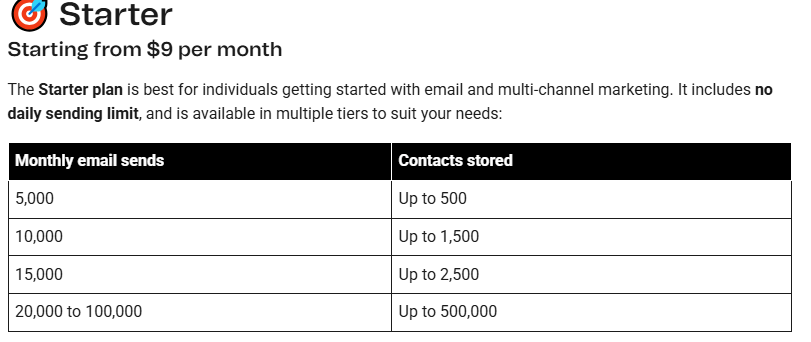
Free planUp to 100,000 stored contacts, 300 emails per dayBreaks atAny time sensitive campaign to a list over 300 peopleUpgradeStarter, $9 / month for 5,000 monthly emails
Brevo flips the industry model. Everyone else charges for contacts stored, Brevo charges for emails sent.
That makes it obvious for a large, dormant list. A 20,000 name database costs nothing until you mail it.
The 300 per day cap is a hard ceiling, not a monthly pool. Send 300 on Monday and you are done until Tuesday, and transactional email counts toward it.
You also get automation, a basic CRM, and segmentation on free. Removing Brevo branding is a separate add-on at roughly $11 per month, which is an annoying line item.
4. Zoho Campaigns: best if you already use Zoho
Free plan2,000 contacts and 6,000 emails per month, foreverBreaks atA/B testing and campaign frequency limitsUpgradeStandard, about $4 / month for 500 contacts
That ratio is sensible. Three emails per contact per month is enough to run a real newsletter, not just test the product.
The real advantage is the ecosystem. If you already run Zoho CRM or Zoho Books, contacts sync without a connector and without a Zapier bill.
Basic workflow automation is included. Advanced segmentation and autoresponder depth sit on paid tiers.
5. EmailOctopus: best for simple, cheap newsletters
Free plan2,500 subscribers, 10,000 emails per month, one form, one landing pageBreaks atYour second lead magnetUpgradePro, around $9 / month at 500 subscribers
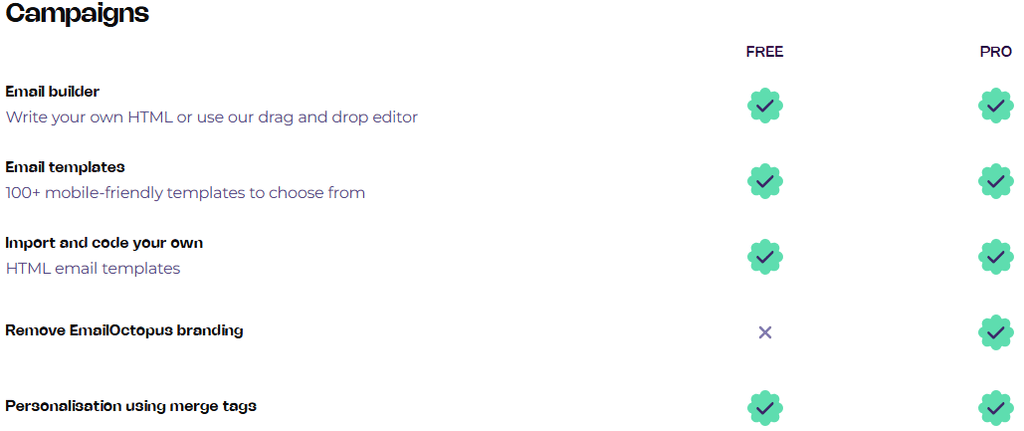
EmailOctopus does email and nothing else. No CRM, no SMS, no live chat, no ecommerce suite.
For a lot of people that is the feature rather than the limitation. The interface is clean and the sending is reliable.
Report history on free is capped at 30 days, which is worth knowing before you build a reporting habit.
6. beehiiv: best free plan for newsletter creators
Free plan2,500 subscribers, unlimited sends, website builder with custom domain, 3 newslettersBreaks atMonetisation and automated onboardingUpgradeScale, $49 / month
Custom domain support on a free plan is genuinely unusual. So is the recommendation network, which lets you swap audience recommendations with other newsletters and grow without ads.
The upgrade is the steepest here. Budget for $49 before you build your whole business on the free tier.
7. Omnisend: best free plan for a brand new store
Free plan250 contacts, 500 emails per month, 60 SMS credits, full ecommerce flowsBreaks atTwo to six weeks after launch, once traffic arrivesUpgradeStandard, $16 / month for 500 contacts
The numbers look stingy next to Sender. The automation quality does not.
Omnisend includes pre built abandoned cart, welcome, and browse abandonment flows on the free plan. Competitors charge $16 to $59 per month for the same thing, as their pricing page shows.
Use the free plan to build your flows properly before you spend anything. Then upgrade with your automations already live.
8. MailerLite: still the nicest editor, now the thinnest free tier
Free plan250 subscribers, 2,500 emails per month, 3 automations, 1 landing pageBreaks atSubscriber 251UpgradeComfort $12 / month, Power $25 / month
MailerLite used to be the default recommendation on lists like this one. The June 2026 change ended that.
Credit where it is due. The update unlocked the HTML editor, custom templates, and promotional pop ups for free users, and added a second seat.
But 250 subscribers is a sandbox. Enforcement tightened in August 2026, so exceeding the limit blocks campaigns, imports, and automation edits until you upgrade or trim your list.
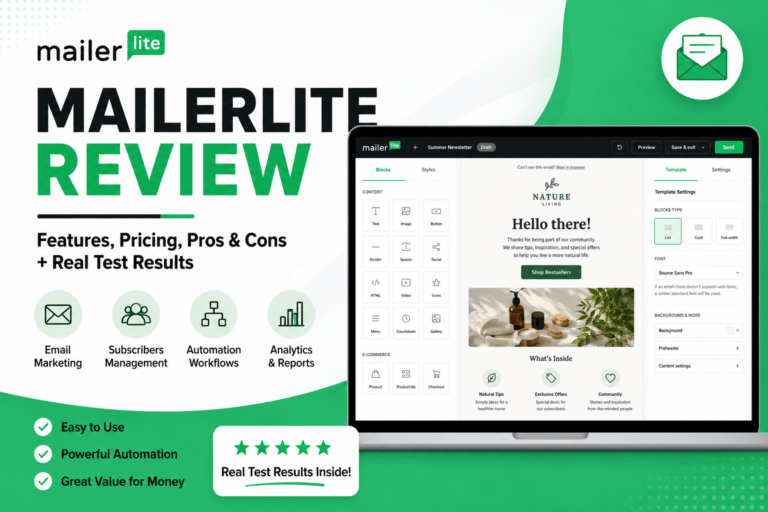
The editor is still the best in this price bracket. Our full MailerLite review covers the new plan structure.
9. Mailchimp: skip the free plan
Free plan250 contacts, 500 emails per month, 250 per day, no automationBreaks atImmediately, for anyone with a real listUpgradeEssentials $13 / month, Standard $20 / month
Mailchimp is still the name most people search for first. Its free plan is now the least useful one in this guide.
Do the arithmetic. With 250 contacts and 500 monthly sends you can email your full list twice, then you are locked out.
There is a further catch. Unsubscribed contacts still count toward your limit unless you archive them, and the same person on two audiences counts twice.
See our Mailchimp review for whether the paid tiers justify the price.
| Tool | First paid plan | From | What it unlocks |
|---|---|---|---|
| Zoho Campaigns | Standard | ~$4 / mo | Unlimited emails, A/B testing |
| Brevo | Starter | $9 / mo | 5,000 monthly emails, no daily cap |
| EmailOctopus | Pro | ~$9 / mo | Branding removal, more forms |
| Sender | Standard | ~$10 / mo | SMS, multi user, no branding |
| MailerLite | Comfort | $12 / mo | 50 automations, unlimited sends |
| Mailchimp | Essentials | $13 / mo | 500 contacts, 5,000 sends, support |
| Omnisend | Standard | $16 / mo | A/B testing, full reporting |
| Kit | Creator | $33 / mo | Unlimited automations and sequences |
| beehiiv | Scale | $49 / mo | Monetisation, automations |
Entry prices at the lowest subscriber tier. Costs rise with your list.
How to pick in 60 seconds
A large list you email occasionallyBrevo. Storage is free, you pay only for volume.
The best all round free planSender. 2,500 subscribers, 15,000 emails, automation included.
A creator building an audience fastKit. Nothing matches 10,000 free subscribers.
A newsletter as the productbeehiiv. Custom domain and the recommendation network.
A brand new online storeOmnisend. Build ecommerce flows free, upgrade when traffic arrives.
You already use ZohoZoho Campaigns. The integration beats any feature comparison.
Cheap foreverEmailOctopus. Free is real and paid stays under $15 for a long time.
The hidden costs of every free plan
Branding. Every platform here puts its logo on your emails at the free tier, and Brevo charges for removal as an add-on even on paid plans.
Deliverability. Free tiers sit on shared IP pools with a higher proportion of low quality senders. Your inbox placement is affected by other people’s list hygiene.
Support. Free plans get email support at best, often only for the first 30 days. When a campaign fails at 9am, that matters.
Switching cost. Every hour spent building forms, templates, and automations is an hour you spend again when the pricing changes. Given the 2026 pattern, assume it will.
When it is time to pay
There are three honest upgrade triggers. Everything else is a vendor nudge.
You need automation. A welcome sequence typically outperforms a broadcast several times over on open rate. If your free plan blocks it, you are losing more than the subscription costs.
You are sending time sensitive campaigns. Daily caps turn a launch into a three day trickle, which kills urgency.
Your list is now a revenue line. Once email drives real sales, shared IP deliverability and a branded footer cost you more than the $12 to $33 you are saving.
A practical rule. If your list earns more per month than the first paid tier costs, upgrade this week.
For the paid platforms, see our email marketing guide and our ActiveCampaign review if you need serious automation depth.
Frequently asked questions
Which free tool has the highest subscriber limit?
Kit, at 10,000 subscribers with unlimited broadcasts. Brevo stores up to 100,000 contacts but caps sending at 300 emails per day.
Which free plans include automation in 2026?
Sender, Brevo, MailerLite, Omnisend, and Zoho Campaigns. Kit removed it in September 2026, and Mailchimp removed it earlier.
Is Mailchimp’s free plan still worth using?
Only for learning the interface. At 250 contacts and 500 monthly sends you cannot run a real list on it.
Do free plans hurt deliverability?
Somewhat. Free tiers share sending infrastructure with a wider mix of senders, though clean list practices matter more than the plan tier.
Can I move my list between platforms later?
Yes, every tool here exports subscribers as CSV. What does not transfer is your automations, forms, and templates, which is the real switching cost.
What is the cheapest paid plan?
Zoho Campaigns, at roughly $4 per month for 500 contacts. Brevo Starter at $9 and EmailOctopus at around $9 are next.
The verdict
If you want one recommendation, it is Sender. It is the only free plan that gives you a usable subscriber count, a usable send allowance, and automation at the same time.
Kit wins on ceiling if you only send broadcasts. Brevo wins if your list is large and quiet.
Whichever you pick, treat the free plan as a starting point rather than a home. The 2026 cuts made one thing clear: the free tier you sign up for is not the free tier you will have in two years.
Plan limits and prices checked September 2026 against each provider’s official pricing and help pages. Providers change these often, so confirm before you commit.
The bottom line
The right email marketing tool is the one that fits your stage and your goals. For most small businesses in 2026, MailerLite is the smartest entry point thanks to its $10 paid plans and full automation on every tier.
Creators should pick Kit for the 10,000-subscriber free plan and built-in monetisation. Beginners who want a familiar, polished interface should look at Mailchimp.
Growing businesses ready to treat email as a serious channel should invest in ActiveCampaign. Each tool has a place, and the four reviews linked above give you the full hands-on detail.

About Vincencia Anyango
IT graduate and freelance web specialist who has built WordPress sites and run email campaigns for clients since 2020. Every review on SoftwareStackPro is based on hands-on testing. More about how I review →