MailerLite Review (2026): Is It Still the Best Value?

Email marketing still delivers the highest return of any digital channel. The average ROI sits between $36 and $42 for every $1 spent, according to Litmus.
MailerLite has built its reputation on three things: doing email well, charging less than the big names, and keeping the interface simple. For years it has been the default recommendation for small businesses on a budget.
In 2026, after a major free plan cut, that pitch is worth a closer look. This review covers what MailerLite costs now, what is still included, and how it compares to the alternatives.
Still the best value, even after the free plan cut
MailerLite remains one of the most affordable serious email platforms in 2026. The drag-and-drop editor is easy, and automation is included on every paid plan.
The price stays low as your list grows. Paid tiers remain excellent value, even though the free plan is now smaller than before.
Small businesses, bloggers, and growing lists that want full features without the high price.
You need 1,000 free subscribers, advanced sales automation, or built-in tools to sell digital products.
Free plan up to 500 subscribers. 14-day trial of paid plans, no credit card.
What is MailerLite?
MailerLite is an email marketing platform built around simplicity and value. It has served small businesses since 2010 and now powers over 1.5 million users.
The focus has always been the same: real features at low prices, without the bloat of enterprise tools.
The platform covers everything a small business needs in one dashboard. That includes campaigns, automation, landing pages, websites, sign-up forms, A/B testing, and reporting.
It is also one of the easiest tools in this category to learn.
MailerLite pricing in 2026
MailerLite has four plans: Free, Growing Business, Advanced, and Enterprise. Pricing is based on your subscriber count, and all paid plans include unlimited monthly emails.
Prices below were current in 2026 and assume 500 subscribers on monthly billing. You can verify the latest rates on the official MailerLite pricing page.
| Plan | Starting price | Best for |
|---|---|---|
| Free | $0 (500 subscribers, 12,000 emails/month) | Trying MailerLite or testing a very small list |
| Growing Business | $10 / month | Most small businesses, with unlimited emails and full automation |
| Advanced | $20 / month | Custom HTML, AI writing assistant, advanced automation |
| Enterprise | Custom pricing | Lists over 100,000 subscribers |
What changed in 2025
In September 2025, MailerLite cut the free plan from 1,000 subscribers to 500. The send limit of 12,000 emails per month stayed the same.
For anyone in the 500 to 1,000 subscriber range, this effectively forces an upgrade to Growing Business at $10 a month.
What to watch
MailerLite is one of the cleaner platforms when it comes to pricing, but a few things are worth knowing before you sign up.
- MailerLite branding on free emails. The free plan adds a small MailerLite logo to outgoing emails. To remove it, you need a paid plan.
- Transactional email is separate. Receipts, password resets, and similar emails are handled through MailerSend, a separate product starting at $7/month.
- Some features need Advanced. Custom HTML, popups, more automation triggers, and the AI writing assistant are reserved for the Advanced plan.
My take: Even after the free plan cut, MailerLite is the cheapest serious email platform in this comparison. The $10 Growing Business plan covers most small businesses comfortably.
Key features (and how they hold up)
Drag-and-drop editor
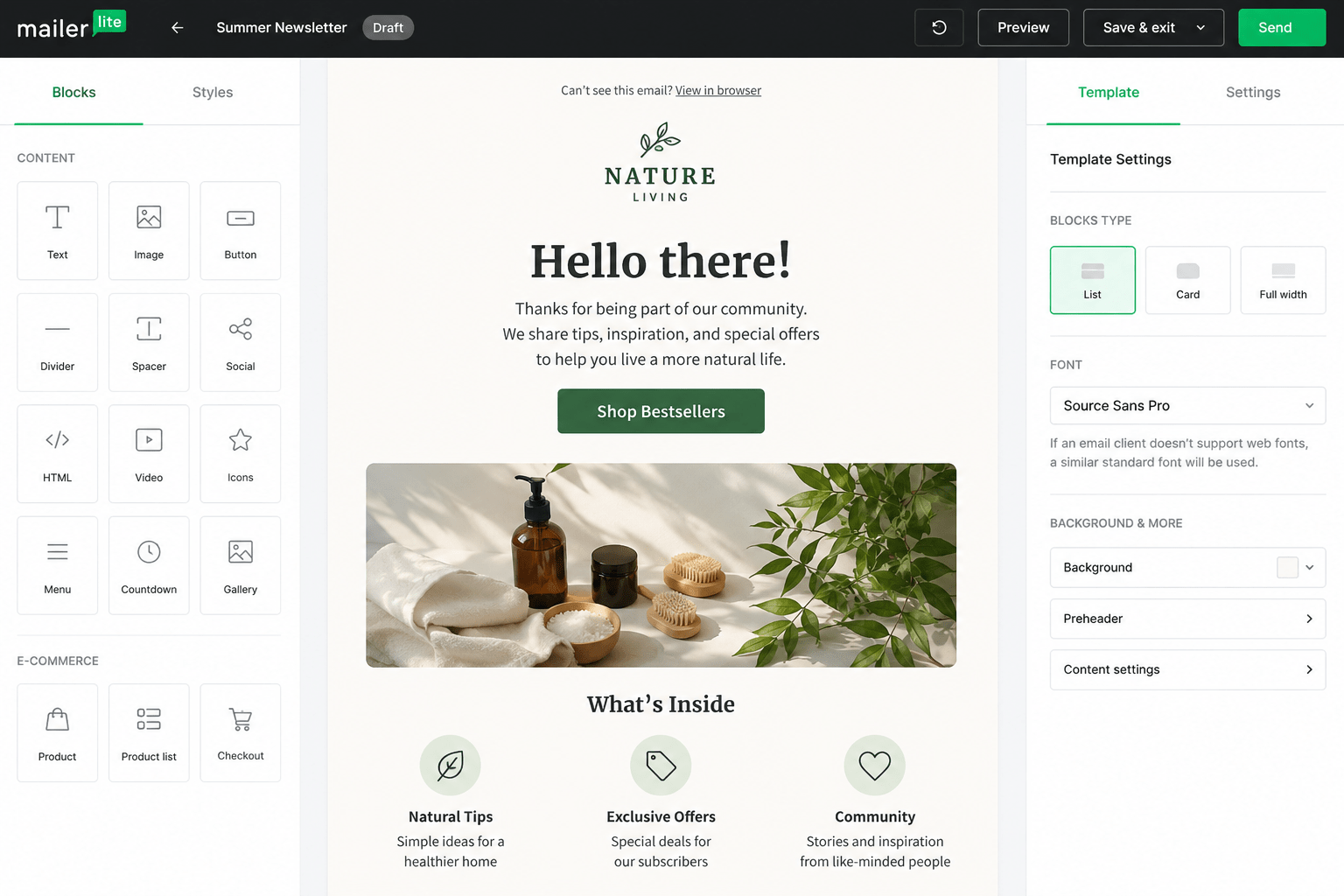
MailerLite’s editor is widely praised for being one of the easiest in the category. You drag blocks into place, edit text inline, and preview on mobile or desktop.
The templates are clean and modern, even if they are less flashy than Mailchimp’s.
I used MailerLite to create a simple welcome newsletter. The editor felt clean and beginner-friendly from the start.
Dragging content blocks into place was straightforward. I built a professional-looking email in less than 30 minutes.
The only thing that slowed me down was finding some of the advanced settings. Overall, the platform was easy to learn and use.
Automation
Automation is included on every plan, including the free one. You can build welcome sequences, drip campaigns, and conditional flows with a visual builder.
That matters more than it sounds. According to Litmus, automated emails drive 37% of all email-generated sales while making up just 2% of email volume.
Compared to Mailchimp, where multi-step automation now requires the Standard plan, this is a significant advantage.
Landing pages and websites
MailerLite includes unlimited landing pages and a basic website builder on every plan. That is unusual at this price point.
You can run a simple site without buying separate web hosting. It is a useful bonus if you do not already have a website online.
Deliverability and support
MailerLite has a strong deliverability reputation and offers 24/7 email support on every paid plan. The Advanced plan adds live chat.
Both support channels are responsive and useful when you hit a wall.
MailerLite pros and cons
What I liked
- Cheapest paid plans in the category, starting at $10/month
- Unlimited monthly emails on every paid plan
- Automation included on the free plan
- Free landing pages and a basic website builder
- Drag-and-drop editor that is genuinely easy to use
- Responsive 24/7 support
What frustrated me
- Free plan cut from 1,000 to 500 subscribers in 2025
- MailerLite branding shown on free plan emails
- Transactional emails need a separate product
- Some features locked to the Advanced plan
- Templates less polished than Mailchimp’s
Who should use MailerLite?
MailerLite is a great fit if you:
- Want a serious email tool at the lowest possible cost
- Run a small business, blog, or growing list on a budget
- Need full automation included without paying extra
- Want a clean, simple editor that does not get in your way
- Like the idea of free landing pages and a basic website
Look elsewhere if you:
- Need a free plan with 1,000+ subscribers (Kit covers 10,000)
- Want polished, magazine-style templates (Mailchimp is stronger)
- Need deep marketing and sales automation (ActiveCampaign)
- Plan to sell digital products from your email tool (Kit has built-in commerce)
MailerLite vs the alternatives
How MailerLite stacks up against the platforms it is most often compared to.
| MailerLite | Mailchimp | Kit (ConvertKit) | |
|---|---|---|---|
| Best for | Value, simplicity | Templates, beginners | Creators |
| Free plan | 500 subscribers | 250 subscribers | 10,000 subscribers |
| Starting paid price | $10 / month | $13 / month | $33 / month (annual) |
| Unlimited emails | Yes, all paid plans | Send limits apply | Yes, all plans |
| Automation on free | Yes | No (Standard and up) | One sequence only |
If you need serious automation depth, see my ActiveCampaign review. For polished design and a familiar interface, the Mailchimp review covers what you get.
For a creator-focused tool with a much larger free plan, read the Kit (formerly ConvertKit) review.
Frequently asked questions
Is MailerLite really free?
Yes, the free plan covers up to 500 subscribers and 12,000 emails per month with no time limit. The trade-off is a small MailerLite logo on every email and no custom domains.
How much does MailerLite cost?
Growing Business starts at $10/month and Advanced at $20/month, both for 500 subscribers with unlimited emails. Annual billing gets you a 10% discount, and prices rise as your subscriber count grows.
Why did MailerLite cut the free plan?
In September 2025, MailerLite reduced the free plan from 1,000 to 500 subscribers. The change pushed users in that range to upgrade to the $10 Growing Business plan, though the send limit of 12,000 emails per month stayed the same.
Is MailerLite good for beginners?
Yes, MailerLite is one of the friendliest places to start serious email marketing. The drag-and-drop editor is one of the simplest in the category, automation is included on every plan, and 24/7 email support is available on paid plans.
How does MailerLite compare to Mailchimp?
MailerLite is cheaper, includes automation on every plan, and has a larger free subscriber limit. Mailchimp has more polished templates and stronger brand recognition.
For most small businesses, MailerLite is better value.
The bottom line
MailerLite remains the best value email platform for most small businesses in 2026. The free plan cut to 500 subscribers stings, but the paid tiers stay among the cheapest in the category.
You get unlimited emails, full automation, free landing pages, and a basic website builder, all for $10 a month.
Email also remains the channel consumers prefer for promotional messages, with 77% choosing it over social or SMS, according to HubSpot research. For a low-cost way to reach that audience, MailerLite is the easiest pick to justify.
Unless you specifically need creator monetisation tools, magazine-style templates, or deep sales automation, this is the smartest entry point.
Free plan up to 500 subscribers. 14-day trial of paid plans, no credit card.
IT graduate and freelance web specialist who has built WordPress sites and run email campaigns for clients since 2020. Every review on SoftwareStackPro is based on hands-on testing. More about how I review →