Brevo Review 2026: Is the Free Plan Really Enough for Your Business?
By Vincencia Anyango · Founder & Lead Reviewer
Last updated: Oct 2026 · 8 min read
Brevo has one of the most talked about free plans in email marketing. It lets you store up to 100,000 contacts and still pay nothing.
But there is a catch. You can only send 300 emails a day, and that one number decides whether the Brevo free plan works for you.
In this Brevo review, we break down exactly what the free plan includes, where it falls short, and when upgrading makes sense. No fluff, just the numbers.
Quick Verdict
The Brevo free plan is enough if your list is under 300 people or you send small, targeted campaigns. It is great for beginners, side projects and transactional emails.
Once your list passes 300 and you want to email everyone at once, the daily cap becomes a wall. That is the point to upgrade or switch.

Sources: Brevo Help Center and Brevo press kit.
In this review
- What is Brevo?
- What the Brevo free plan includes
- The 300 emails a day limit explained
- Other free plan limits
- Brevo pricing 2026: paid plans
- Brevo free plan vs competitors
- Pros and cons
- Who should use it
- How to stretch the free plan
- Final verdict
- FAQ
What Is Brevo?
Brevo is an all in one marketing platform from Paris, France. It was called Sendinblue until it rebranded in 2023.
It covers email campaigns, automation, SMS, WhatsApp, live chat and a simple CRM. According to its press page, more than 500,000 businesses in over 180 countries use it.
Email still matters a lot. Statista estimates there are more than 4.5 billion email users worldwide.
And it pays. Litmus reports an average return of $36 for every $1 spent on email marketing.
How Brevo pricing is different
Most tools charge by the number of subscribers you store. Brevo charges by the number of emails you send.
That makes it cheap for large lists you email rarely. It makes it costly for small lists you email often.
What the Brevo Free Plan Includes
The Brevo free plan has no time limit and needs no credit card. Here is what you get, based on Brevo’s own help documentation.
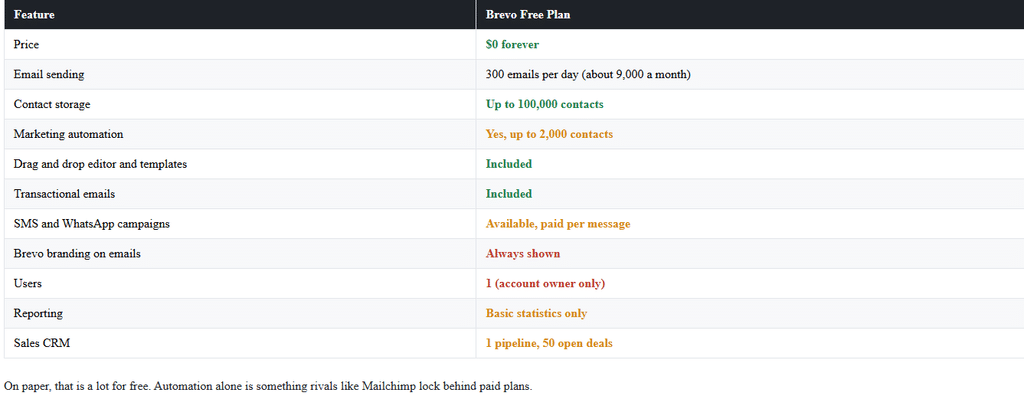
On paper, that is a lot for free. Automation alone is something rivals like Mailchimp lock behind paid plans.
The 300 Emails a Day Limit Explained
This is the part most Brevo reviews skip over. The limit is per day, not per month.
Unused emails do not roll over. If you send zero on Monday, you still only get 300 on Tuesday.
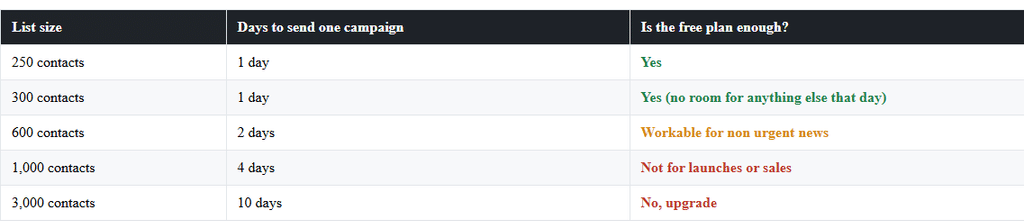
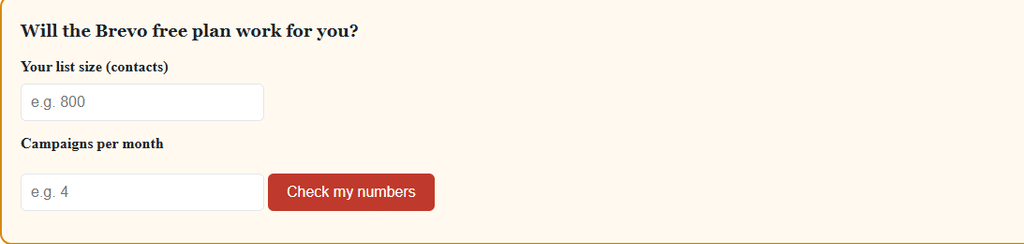
So the real question is simple. How many days does it take to reach your whole list once?
Watch out

Other Brevo Free Plan Limits You Should Know
1. Brevo branding on every email
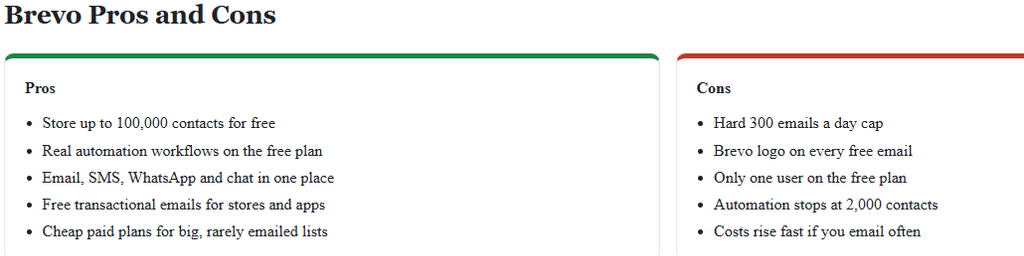
Every free email carries a “Sent with Brevo” badge. You cannot remove it on the free plan.
2. Automation caps at 2,000 contacts
Up to 2,000 unique contacts can enter your active automations. After that, new contacts stop entering, while people already inside keep moving through.
3. One user only
Only the account owner can log in. Teams or virtual assistants will need a paid plan.
4. Basic reports
You see opens, clicks and bounces. A/B testing, heatmaps and advanced stats are paid features.
5. Limited support
Free users get basic support only. Phone support is reserved for higher tiers.
Brevo Pricing 2026: Paid Plans
When you outgrow the free plan, Brevo has several paid tiers. Prices rise with the number of emails you send each month.

Prices change often. Always confirm on the official Brevo pricing page before you buy.

Brevo Free Plan vs Competitors
How does the Brevo free plan stack up against other popular tools? Here is a quick side by side.

Brevo wins on contact storage and automation. Kit wins if you want to email a big list in one go without a daily cap.
Want the full breakdown? Read our guide to the best Mailchimp alternatives.
Who Should Use the Brevo Free Plan?
The free plan is enough if you:
- Have fewer than 300 subscribers
- Run a side project, club, church or small local business
- Mainly need transactional emails like order confirmations
- Want to test automation before paying anything
You should upgrade or switch if you:
- Need to email more than 300 people on the same day
- Run product launches or flash sales
- Want a clean, unbranded look
- Have a team that needs its own logins
If you plan heavy automation, also compare Brevo with ActiveCampaign. It costs more but goes much deeper.
How to Stretch the Brevo Free Plan
- Segment your list. Send to your most engaged 300 first, then the rest the next day.
- Clean inactive contacts. Removing people who never open saves daily sends and helps deliverability.
- Keep automations short. Fewer welcome emails means more room for newsletters.
- Send less, but better. One strong weekly email beats three weak ones.
- Grow smart. Follow our guide on how to build an email list and upgrade only when the cap blocks real revenue.
Final Verdict: Is the Brevo Free Plan Enough?
For beginners, yes. The Brevo free plan gives you more contacts and automation than almost any other free tool.
For growing lists, no. Once you pass 300 subscribers, the daily cap slows every campaign you send.
Our advice is simple. Start free, build your list, and move to Standard when you need to reach everyone in one day.
Our rating: 4.3 out of 5
Brevo Free Plan FAQ
Is the Brevo free plan really free forever?
Yes. The free plan has no time limit and does not need a credit card.How many emails can I send on the Brevo free plan?
You can send 300 emails per day. That works out to roughly 9,000 a month if you send every day.How many contacts can I store on Brevo for free?
You can store up to 100,000 contacts. Only 2,000 of them can enter your automations.Can I remove the Brevo logo on the free plan?
No. Every free email includes the “Sent with Brevo” badge. You need a paid plan to remove it.Is Brevo better than Mailchimp’s free plan?
For most beginners, yes. Brevo stores far more contacts and includes real automation, while Mailchimp’s free plan is limited to 500 contacts.When should I upgrade from the Brevo free plan?
Upgrade when your list passes 300 and you need to email everyone on the same day. Also upgrade if you need more than 2,000 contacts in automations.

About Vincencia Anyango
IT graduate and freelance web specialist who has built WordPress sites and run email campaigns for clients since 2020. Every review on SoftwareStackPro is based on hands on testing. More about how I review →
Related reading :
>>>5 Best Mailchimp Alternatives in 2026 That Are Cheaper and Easier
>>>Best Free Email Marketing Plans Compared Side by Side
>>>Email Automation Workflows That Actually Convert (With Screenshots From My Own Account)