Email Automation Workflows That Actually Convert (With Screenshots From My Own Account)

By Vincencia Anyango · Founder & Lead Reviewer
Last updated: October 2026 · 12 min read
Most email automation workflows look great on a whiteboard and earn nothing in real life. I have built, broken and rebuilt these flows inside my own accounts, so this guide only covers the ones that pay.
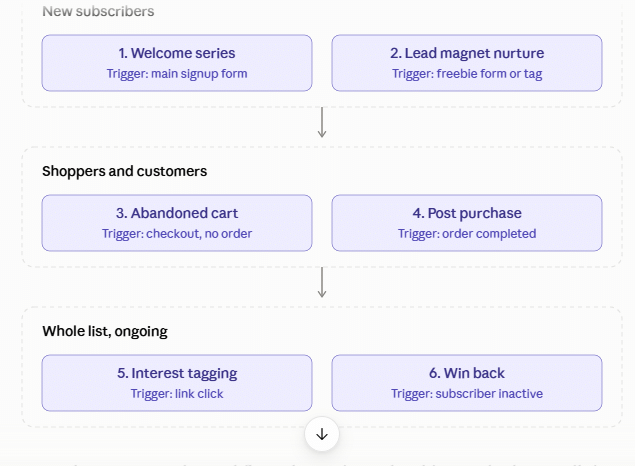
You will get six workflows, the exact timing for each email, and the numbers to aim for. Every build includes a screenshot from my own account so you can copy the setup.
Quick answer: Start with a welcome series and a lead magnet follow up. Add cart recovery if you sell products, then a win back flow to keep your list clean.
In this guide
- Why email automation workflows beat regular campaigns
- Workflow 1: Welcome series
- Workflow 2: Lead magnet nurture
- Workflow 3: Abandoned cart recovery
- Workflow 4: Post purchase follow up
- Workflow 5: Click based interest tagging
- Workflow 6: Win back and list cleaning
- Which tool should you build them in?
- FAQ
Why Email Automation Workflows Beat Regular Campaigns
A campaign goes to everyone at a time you choose. An automated workflow goes to one person at the moment they show interest.
That timing is the whole advantage. The data behind it is hard to ignore.
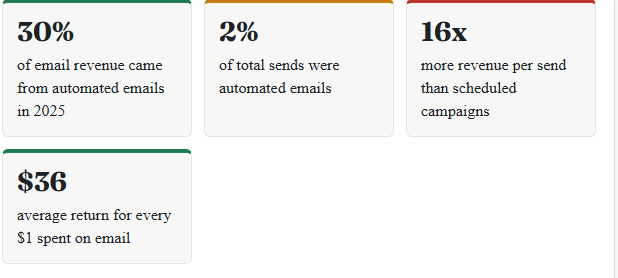
The first three figures come from the Omnisend 2026 Ecommerce Marketing Report, which studied 27 billion emails from 150,000 brands. It found automated emails earned $2.87 per send against $0.18 for scheduled campaigns.
The ROI figure comes from Litmus research on email ROI. Automation is how small senders get close to that number without mailing more often.
Klaviyo’s 2026 benchmarks tell the same story. Automated flows made up about 5% of sends but roughly 41% of email revenue, with an order rate of 2.11% against 0.16% for campaigns.
If your list is still small, grow it first. My roundup of the best free email marketing tools shows where you can start without paying.
Workflow 1: The Welcome Series
This is the first workflow to build. A new subscriber is never more interested in you than in the first hour.
Omnisend lists welcome emails among its three best performing automations, next to cart recovery and back in stock alerts. Skipping it wastes your warmest moment.
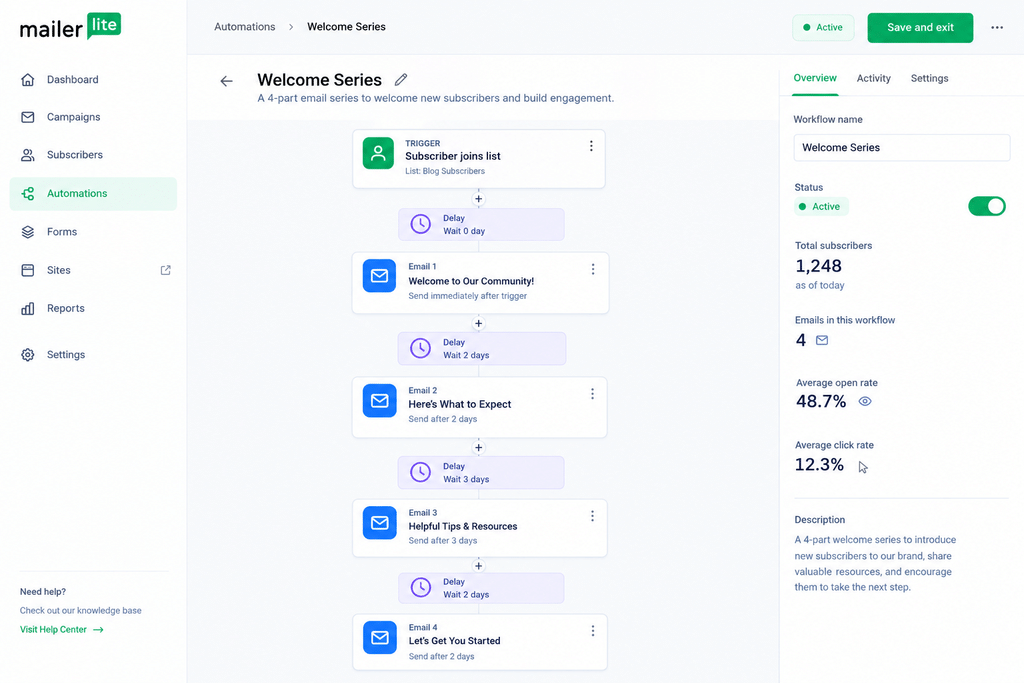
Trigger: someone joins your main signup form.
| When | What it does | |
|---|---|---|
| 1. Welcome | Instantly | Delivers what you promised and sets expectations |
| 2. Your story | Day 2 | Explains who you are and why you are worth reading |
| 3. Best content | Day 4 | Links to your two or three most useful posts |
| 4. Soft offer | Day 7 | Introduces one product, service or recommended tool |
Workflow 2: Lead Magnet Nurture
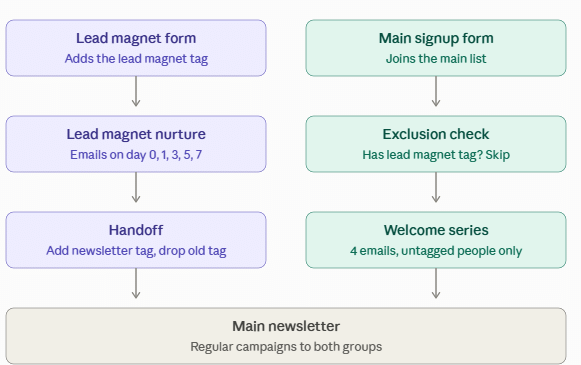
A lead magnet is a free checklist, template or guide offered in exchange for an email address. This workflow delivers it, then teaches around it.
The mistake most people make is sending the download and going silent. The follow up emails are where trust gets built.
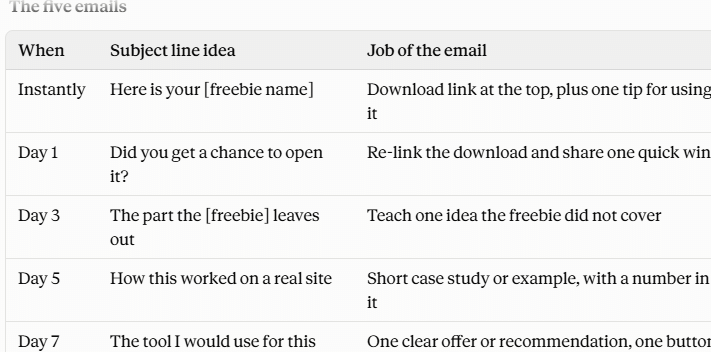
Trigger: someone joins a specific form or gets a specific tag.
- Instantly: send the download link and one tip for using it.
- Day 1: ask if they opened it and share a quick win.
- Day 3: teach one idea the freebie did not cover.
- Day 5: show a short case study or example.
- Day 7: make one clear offer related to the freebie.
Workflow 3: Abandoned Cart Recovery
If you sell anything online, this is your highest earning workflow. Around 70% of online shopping carts are abandoned, according to Baymard Institute.
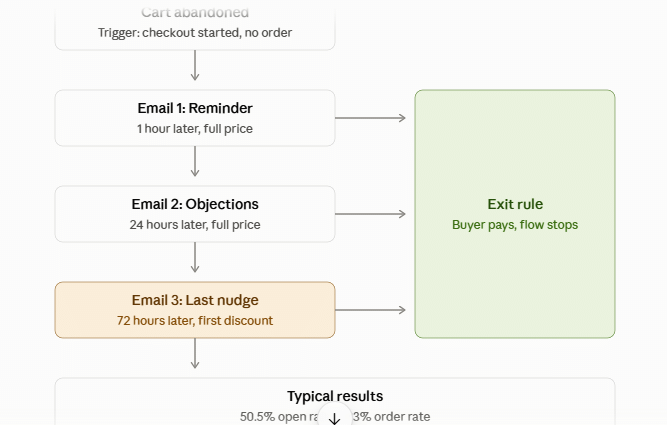
Klaviyo’s abandoned cart benchmarks put the average open rate at 50.5% and the order rate at 3.33%. The average flow earned $3.65 per recipient, and the top 10% earned $28.89.
Trigger: someone starts checkout and does not buy.
| When | What it does | |
|---|---|---|
| 1. Reminder | 1 hour later | Shows the item and a button back to the cart |
| 2. Objections | 24 hours later | Answers shipping, returns and trust questions |
| 3. Last nudge | 72 hours later | Adds urgency or a small incentive |
Workflow 4: Post Purchase Follow Up
Selling to an existing customer is far easier than finding a new one. This workflow turns a first order into a second one.
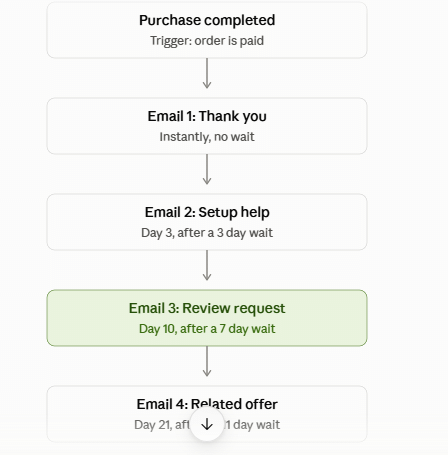
Trigger: someone completes a purchase.
- Instantly: thank them and confirm what happens next.
- Day 3: send setup tips or a short how to guide.
- Day 10: ask for a review or a quick reply.
- Day 21: suggest one related product or upgrade.
Workflow 5: Click Based Interest Tagging
This is the workflow most beginners never build. It quietly sorts your list by what people actually care about.
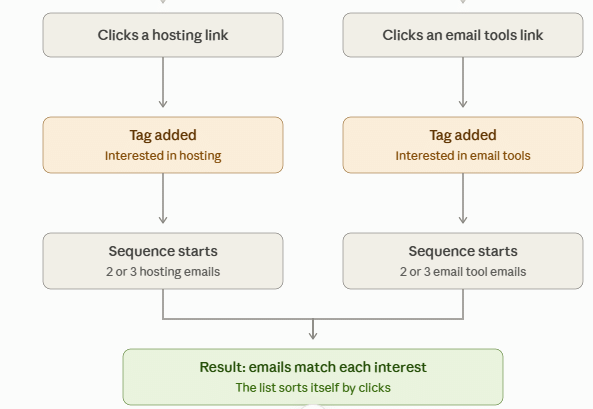
Trigger: a subscriber clicks a specific link in any email.
Say you write about hosting and email tools. When someone clicks a hosting link, the workflow tags them “interested in hosting” and sends two or three hosting emails.

Workflow 6: Win Back and List Cleaning
Inactive subscribers cost money and hurt deliverability. This workflow gives them one fair chance, then removes them.
Google’s email sender guidelines tell senders to keep spam complaint rates below 0.3%. Mailing people who stopped caring is the fastest way to cross that line.
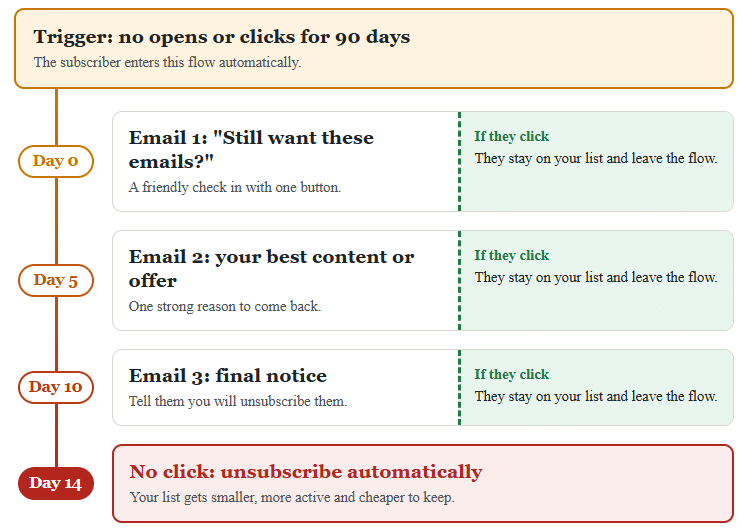
Trigger: no opens or clicks for 90 days.
- Day 0: a friendly “still want these emails?” message with one button.
- Day 5: your single best piece of content or offer.
- Day 10: a final notice that you will unsubscribe them.
- Day 14: automatically unsubscribe anyone who did not click.
Which Tool Should You Build These Workflows In?
All four tools I have reviewed can run these workflows. They differ in how far the automation goes and what it costs.
| Tool | Automation strength | Best for | My review |
|---|---|---|---|
| MailerLite | Simple visual builder that covers all six workflows | Beginners on a budget | MailerLite review |
| Kit | Tag based visual automations, very easy to follow | Bloggers and creators | Kit review |
| Mailchimp | Solid journeys, but branching needs a higher plan | Small shops already using it | Mailchimp review |
| ActiveCampaign | The deepest logic, scoring and CRM triggers | Growing businesses with sales teams | ActiveCampaign review |
Plans and limits change often, so check each pricing page before you commit. Torn between the two budget picks? Read my MailerLite vs Kit comparison.
Still unsure? Take the two minute email tool quiz and get a match for your situation.
How to Tell If a Workflow Is Converting
Open rates are less reliable than they used to be. Judge each workflow by clicks and by the action you actually want.
- Click rate: shows whether the email earned attention.
- Conversion rate: the share of people who bought, booked or replied.
- Revenue per recipient: total revenue divided by people who entered the flow.
- Unsubscribe rate per email: a spike tells you which email to rewrite.
Review each workflow once a month. Change one thing at a time, such as a subject line or a delay, so you know what caused the result.
Five Mistakes That Kill Conversions
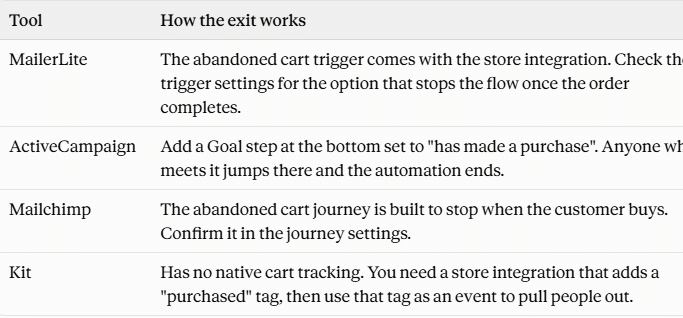
- No exit rules. Buyers keep getting sales emails after they have paid.
- Overlapping flows. One person gets three automated emails in a day.
- Too many links. Give each email one job and one button.
- Set and forget. Old offers and broken links sit unnoticed for months.
- Building everything at once. One finished workflow beats six half built ones.
Frequently Asked Questions
What is an email automation workflow?
It is a series of emails that sends automatically when a subscriber does something, such as joining a form or abandoning a cart. You build it once and it runs for every new person who meets the trigger.Which email automation workflow should I build first?
Build a welcome series first. It reaches every new subscriber at their most interested moment and takes about an hour to set up.How many emails should a workflow have?
Three to five emails works for most workflows. Start with three, check the numbers after a month, then add more only if people are still clicking.Do automated emails really convert better than campaigns?
Yes. Omnisend’s 2026 report found automated emails earned 16 times more revenue per send than scheduled campaigns, because they reach people at the moment they show interest.Can I build email automation workflows on a free plan?
Some tools include basic automation on free plans, but limits are tight and change often. Check the current plan page before you choose, and expect to pay once you need branching logic.How long before a workflow shows results?
Give it at least 30 days or 100 people through the flow, whichever comes later. Smaller samples swing too much to trust.
The Bottom Line
Email automation workflows convert because they answer a real action at the right moment. A small share of your sends can end up driving a large share of your revenue.
Build the welcome series this week and the lead magnet nurture next week. Add the other four as your list and your offers grow.

About Vincencia Anyango
IT graduate and freelance web specialist who has built WordPress sites and run email campaigns for clients since 2020. Every review on SoftwareStackPro is based on hands on testing. More about how I review →
Related reading
>>>Kit vs Mailchimp: Which One Should Bloggers Choose?
>>>How to Build an Email List From Zero to 1,000 Subscribers