How to Start a WordPress Blog in 2026 (9 Easy Steps + Real Costs)
Disclosure: SoftwareStackPro may earn a commission if you sign up through some links on this page, at no extra cost to you. It never changes our verdicts. Read our affiliate disclosure.
WordPress runs about 41% of all websites on the internet. Its closest rival, Shopify, sits at around 5%.
I have been building WordPress sites since 2020, including this one. This guide shows exactly how I would start a WordPress blog today, including the mistakes that cost me time.
The short answer
You can start a WordPress blog in about an hour for roughly $30 to $120 in your first year. You need a domain name, WordPress-ready hosting, and the free WordPress software.
The setup is the easy part. The hard part is picking the right host, dodging renewal price traps, and writing posts people actually search for.
Here is the full process in nine steps:
- Pick a niche people actually search for
- Choose a name and register your domain
- Buy WordPress-ready hosting
- Install WordPress and switch on HTTPS
- Fix five settings before you write anything
- Install a lightweight theme
- Add a lean plugin stack
- Connect Yoast SEO and Google Search Console
- Publish your first post the right way
Why WordPress is still the smart choice in 2026
WordPress powers 41.2% of all websites, according to W3Techs data from July 2026. Among sites using a known content management system, its share is 59.1%.
That share has slipped slightly from 43.2% in December 2025. Analysts link part of the dip to very simple sites moving to AI website builders.
For bloggers, that changes nothing. You still get the biggest plugin library, the most tutorials, and full ownership of your content.
The software keeps improving too. WordPress 7.0 shipped on May 20, 2026 with new core foundations for AI tools, and version 7.1 followed on August 19.
WordPress.org vs WordPress.com
This guide covers self-hosted WordPress from WordPress.org. The software is free, you choose your own host, and you control ads and affiliate links.
WordPress.com is a hosted service run by Automattic. It is simpler on day one, but plugins and monetization are limited on the cheaper plans.
What it costs to start a WordPress blog
Most beginners overpay in year two, not year one. Hosting companies advertise a low intro rate, then renew at up to four times that price.
Always read the renewal line at checkout before you pay. That single habit can save you more than any coupon code.
Step 1: Pick a niche people actually search for
This is the step most new bloggers skip. It is also the main reason most blogs never get traffic.
An Ahrefs study of around 14 billion pages found that 96.55% of them get zero visits from Google. Topics with no search demand were one of the top causes.
A good blog niche passes three simple tests:
- Demand: People search for it. Google Trends and Google’s own autocomplete suggestions are a free place to start.
- Money: Products, software, or services exist that you can honestly recommend.
- Depth: You know enough to write at least 30 useful posts without running dry.
Keyword research still pays off. Orbit Media’s 2026 survey of 1,042 content marketers found it still separates blogs that perform from blogs that do not.
Step 2: Choose a name and register your domain
Keep your name short, easy to spell, and a .com if possible. Avoid hyphens and numbers.
Think a little wider than your first topic. A name like SoftwareStackPro leaves room for email tools, hosting, and AI, not just one product.
Many hosts include a free domain for the first year. After that, a .com typically costs around $10 to $20 a year.
Turn on domain privacy when you register. It keeps your home address and phone number out of public records, and many registrars include it free.
Step 3: Buy WordPress-ready hosting
Your host is the foundation of your blog. It decides how fast pages load, how often your site goes down, and what you pay every year.
Speed has a real money value. In the Google and Deloitte Milliseconds Make Millions study, a mobile site just 0.1 seconds faster lifted retail conversions by 8.4%.
The minimum technical requirements
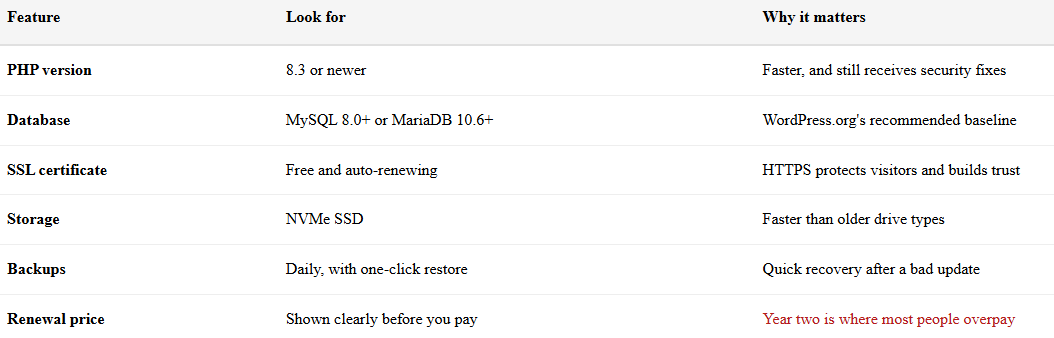
WordPress.org recommends PHP 8.3 or newer, MySQL 8.0 or MariaDB 10.6 or newer, and HTTPS. Older versions still run WordPress, but they are past end of life and a security risk.
Any decent host meets these. If the sales page does not say, ask support before you pay.
| Feature | Look for | Why it matters |
|---|---|---|
| PHP version | 8.3 or newer | Faster, and still receives security fixes |
| Database | MySQL 8.0+ or MariaDB 10.6+ | WordPress.org’s recommended baseline |
| SSL certificate | Free and auto-renewing | HTTPS protects visitors and builds trust |
| Storage | NVMe SSD | Faster than older drive types |
| Backups | Daily, with one-click restore | Quick recovery after a bad update |
| Renewal price | Shown clearly before you pay | Year two is where most people overpay |
| Data center | Close to your readers | Shorter distance means faster load times |
| Refund window | 30 days or more | Time to test before you commit |
Which host should a new blogger pick?
For most beginners, shared WordPress hosting is enough for the first year. Hostinger and Bluehost are the two most common starting points, and both offer one-click WordPress installs, free SSL, and a 30-day money-back guarantee.
Hostinger usually wins on intro price and features per dollar. Bluehost suits people who want phone support, but untick the paid add-ons shown at checkout.
Our Bluehost vs Hostinger speed and uptime test is coming soon. Until then, read our guide to the best website hosting or our Bluehost vs Namecheap comparison.
Best value for new blogs
Hostinger
Low intro pricing, NVMe storage, and one-click WordPress. Best value on longer terms.
Check Hostinger pricingBest for phone support
Bluehost
Recommended by WordPress.org with 24/7 phone support. Untick the paid add-ons at checkout.
Check Bluehost pricingLonger terms get the lowest monthly price. If you are not sure you will stick with blogging, a 12-month plan costs more per month but far less upfront.
Step 4: Install WordPress and switch on HTTPS
Most hosts now install WordPress for you during onboarding. If yours does not, look for a one-click WordPress installer in the control panel.
Once it is installed, log in at yourdomain.com/wp-admin. Bookmark that page.
Next, confirm HTTPS is working. Visit your site and check for the padlock in the address bar.
Most hosts issue a free SSL certificate automatically. It can take a few hours to activate after a new domain connects.
Step 5: Fix five settings before you write anything
These take about ten minutes. Changing some of them later can break links and cost you rankings.
- Permalinks: Go to Settings > Permalinks and choose “Post name.” This gives clean URLs like /how-to-start-a-wordpress-blog/.
- Site title and tagline: Go to Settings > General. Write a tagline that says clearly what your blog covers.
- Search visibility: Go to Settings > Reading. Make sure “Discourage search engines from indexing this site” is unticked at launch.
- Timezone: Go to Settings > General. Set your local timezone so scheduled posts go live on time.
- Display name: Go to Users > Profile. Pick the exact name you want shown as the author.
While you are there, delete the sample “Hello world!” post and the Sample Page. They add nothing for readers or Google.
Step 6: Install a lightweight theme
Your theme controls how your blog looks. For speed, choose a lightweight theme with strong reviews and recent updates from the WordPress theme directory.
Popular free options include Astra, Kadence, and GeneratePress. Avoid heavy multipurpose themes packed with sliders and demo content you will never use.
Step 7: Add a lean plugin stack
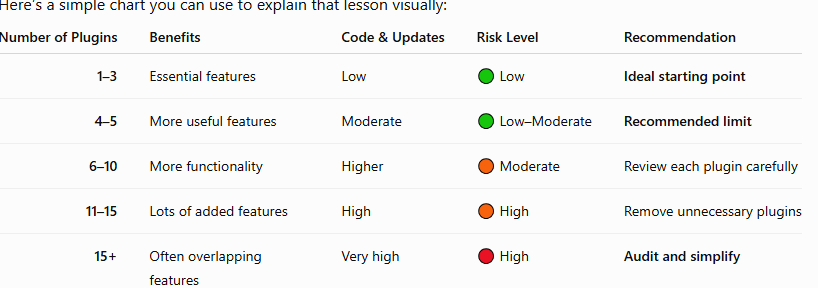
On SoftwareStackPro, the core of our stack is Yoast SEO and Site Kit by Google. Site Kit connects Search Console, Analytics, and AdSense in one dashboard without touching code.
Step 8: Connect Yoast SEO and Google Search Console
SEO decides whether anyone finds your posts. Two free tools cover the basics.
Set up Yoast SEO
Install Yoast SEO and run its first-time configuration. It creates your XML sitemap and adds structured data automatically.
For every post, fill in three fields: the focus keyphrase, the SEO title, and the meta description. Keep SEO titles under about 60 characters and meta descriptions around 150 to 160.
Submit your sitemap to Google Search Console
Google Search Console shows which searches bring readers to your blog. It is free, and Site Kit can verify your site in a few clicks.
Once verified, open Sitemaps and submit yourdomain.com/sitemap_index.xml. That is the sitemap address Yoast creates for you.
If you read one official resource, make it Google’s short SEO Starter Guide. It explains how Google finds and ranks pages in plain English.
Step 9: Publish your first post the right way
Now the real work starts. Orbit Media’s 2026 survey found the average blog post is 1,312 words and takes 3 hours and 20 minutes to write.
The same survey found only 13.9% of content marketers say their blog delivers strong results. That is an all-time low, and the gap comes down to where people put their effort.
What the top performers still do
Orbit Media’s data points to a few habits that still correlate with results:
- More effort per post: Writers who spend more time on each article remain more likely to see strong results.
- Visuals: More visual posts tend to perform better. Use your own screenshots, not stock photos.
- Human editing: Blogs with a formal human editing step beat those that leave editing to AI.
- Original data: Publishing your own research or test results improves the odds of strong performance by 50%.
What about AI writing tools?
Orbit Media found 92.4% of content marketers now use AI for blogging. Yet none of the AI use cases they measured correlated with better results.
Use AI to brainstorm and check your work. Write the experience, opinions, and test results yourself, because that is what makes a post worth reading.
How to grow and make money from your blog
Search clicks are getting harder to win. Ahrefs reports that AI Overviews are associated with a 58% lower average click-through rate for the top-ranking page.
That makes owning your audience more valuable than ever. These are the three income streams most bloggers start with.
1. Build an email list from day one
An email list is traffic no algorithm can take away. Most email platforms offer free plans for small lists.
We have reviewed the main options. Start with our Kit (ConvertKit) review for creators, our Mailchimp review for small businesses, or our ActiveCampaign review if you need advanced automation.
2. Join affiliate programs
Affiliate marketing pays you a commission when readers buy through your links. Many programs review your site before approving you, so publish a solid batch of helpful posts first.
Always disclose affiliate links clearly. In the US, the FTC’s Endorsement Guides require it, and a dedicated affiliate disclosure page builds.
3. Display ads
Google AdSense is the easiest ad network to start with, and Site Kit connects it to WordPress in a few clicks. Ad income stays small until traffic grows, so treat it as a bonus rather than a plan.
Common mistakes to avoid
- Choosing a host on intro price alone and ignoring the renewal rate
- Installing 20 or more plugins in your first week
- Leaving “Discourage search engines” ticked after launch
- Writing about topics nobody searches for
- Changing your permalink structure after posts are already indexed
- Skipping backups until something breaks
Frequently asked questions
How much does it cost to start a WordPress blog?
Expect roughly $30 to $120 for your first year. That covers shared hosting and a domain, while WordPress, a good theme, and core plugins can all be free.
Can I start a WordPress blog for free?
You can use WordPress.com’s free plan, but you get a subdomain and limited monetization. For a blog you want to earn from, self-hosted WordPress with paid hosting is worth the small cost.
How long does it take to set up a WordPress blog?
The technical setup takes about an hour. Writing your first proper post takes longer, since the average blog post takes over three hours to write.
Do I need coding skills to start a WordPress blog?
No. One-click installers, the block editor, and plugins handle everything most bloggers need.
What is the best hosting for a new WordPress blog?
For most beginners, shared WordPress hosting from a provider like Hostinger or Bluehost is enough. Check the renewal price, PHP 8.3 support, free SSL, and backups before you buy.
How do bloggers make money with WordPress?
The most common ways are affiliate links, display ads, and selling to an email list. Most blogs need steady search traffic before income becomes meaningful.
Is WordPress good for SEO?
Yes. With clean permalinks, a fast host, and a plugin like Yoast SEO, you control titles, meta descriptions, sitemaps, and structured data.
Final thoughts
Starting a WordPress blog in 2026 is easy. Starting one that earns takes a searchable niche, a fast and fairly priced host, and posts built on real experience.
Work through the nine steps above in order. Then publish consistently and measure what works.
Ready to begin? Compare hosts in our web hosting reviews, or see the full toolkit we use on our recommended stack page.
The bottom line
Kit is still one of the strongest email platforms for creators in 2026. The free plan up to 10,000 subscribers, the tag-based subscriber model, and the built-in commerce tools all set it apart. The September 2025 price rises do hurt its value, especially against MailerLite.
If you are a creator who plans to grow and monetise a list, Kit is well worth the money. If you mostly want a simple newsletter and watch every dollar, a cheaper alternative may suit you better.
Free plan up to 10,000 subscribers. 14-day trial of paid plans.

About Vincencia Anyango
IT graduate and freelance web specialist who has built WordPress sites and run email campaigns for clients since 2020. Every review on SoftwareStackPro checks pricing and plan limits against the vendor’s own pages. More about how I review →
Related reading
Best Free Email Marketing Tools: Every Limit, Tested
Best Website Hosting: Why Your Website Dies Without The Right Provider